

Challenge
The Challenge
Many client websites require interactive maps, location overviews, office finders or property listings. Existing solutions often depend on Google Maps, introduce API costs, or lack flexibility for custom content structures.
The goal was to develop an internal plugin that gives both editors and developers complete control over map data while remaining independent from commercial map providers.
Solution
The Solution
Cherry OpenStreetMap was developed as a modular WordPress plugin built around two core concepts:
Standalone Map Builder
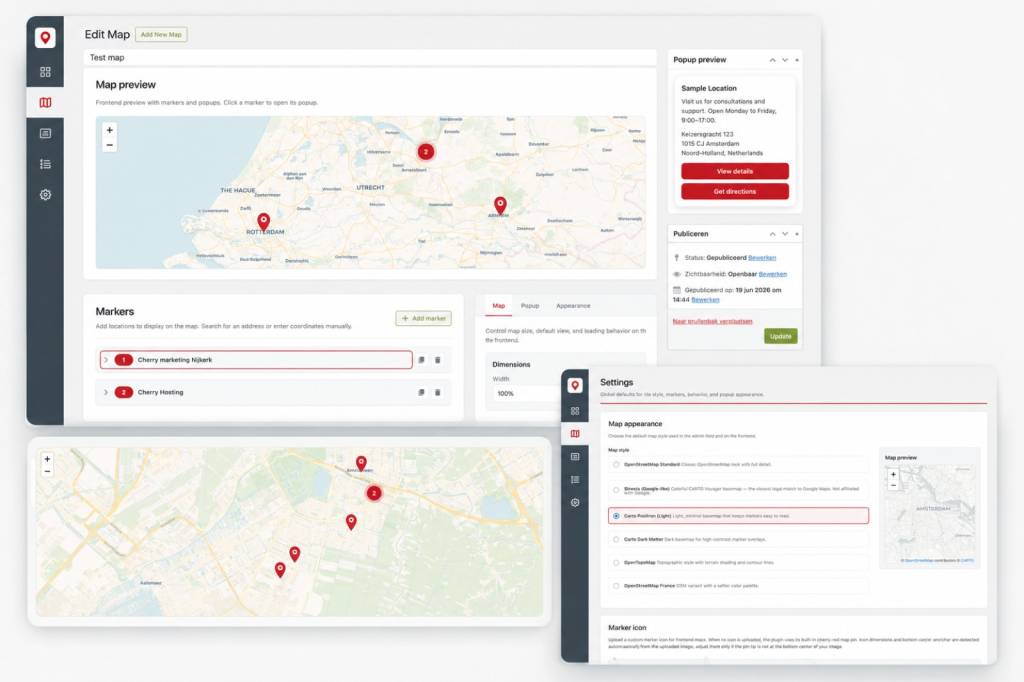
Editors can create reusable maps through a dedicated Maps section within WordPress. Markers, popup content, styling and map settings can be managed without writing code.
ACF Integration
The plugin introduces a custom OpenStreetMap field for Advanced Custom Fields. Locations can be attached directly to posts, custom post types or content modules and automatically rendered as single or multi-marker maps.

Features
Features
Flexible Map Generation
- Single location maps
- Multi-marker maps
- Dynamic post queries
- Custom post type support
Editor Experience
- Search-based geocoding
- Drag-and-drop markers
- Geolocation support
- Live map previews
Developer Experience
- Shortcode generator
- Extendable tile providers
- Filter hooks
- Modular architecture
- Reusable rendering components
Highlights
Technical Highlights
1
Custom ACF field type
Native editor experience
2
Leaflet.js integration
Lightweight frontend maps
3
OpenStreetMap tiles
No Google Maps dependency
4
AJAX geocoding
Fast editor workflow
5
Modular class architecture
Maintainable codebase
6
Shortcode engine
Flexible implementation
Results
The results
100%
Open Source Mapping
A lot
Faster Project Delivery
100%
Reusable Internal Product

Outcome
The Outcome
Cherry OpenStreetMap demonstrates how custom WordPress tooling can solve recurring client requirements while improving both editor usability and developer efficiency. The project combines modern open-source mapping technology with a native WordPress experience and provides a scalable foundation for future location-based websites.